
In today’s fast-paced digital world, businesses are constantly seeking innovative ways to improve efficiency, reduce costs, and stay competitive. One of the most significant steps a business can take toward modernization is transitioning from paper-based workflows to digital signatures. This shift not only streamlines operations but also helps organizations reduce their environmental footprint, enhance security, and comply with legal standards more effectively. However, many companies are hesitant to make the leap due to concerns about disrupting daily operations. This comprehensive guide outlines actionable strategies, expert insights, and practical tips to help you transition seamlessly without interrupting your business activities.
Whether you’re a small startup or a large enterprise, transitioning to digital signatures can transform your operational efficiency. By walking through the benefits, challenges, and practical steps for implementation, this guide will empower you to embrace digital workflows confidently.
Understanding the Benefits of Digital Signatures
Before embarking on the transition, it’s important to understand the multitude of benefits that digital signatures offer. Digital signatures do more than just replace traditional handwritten signatures—they revolutionize the way businesses handle documentation. Here’s a closer look at the advantages:

1. Cost Savings
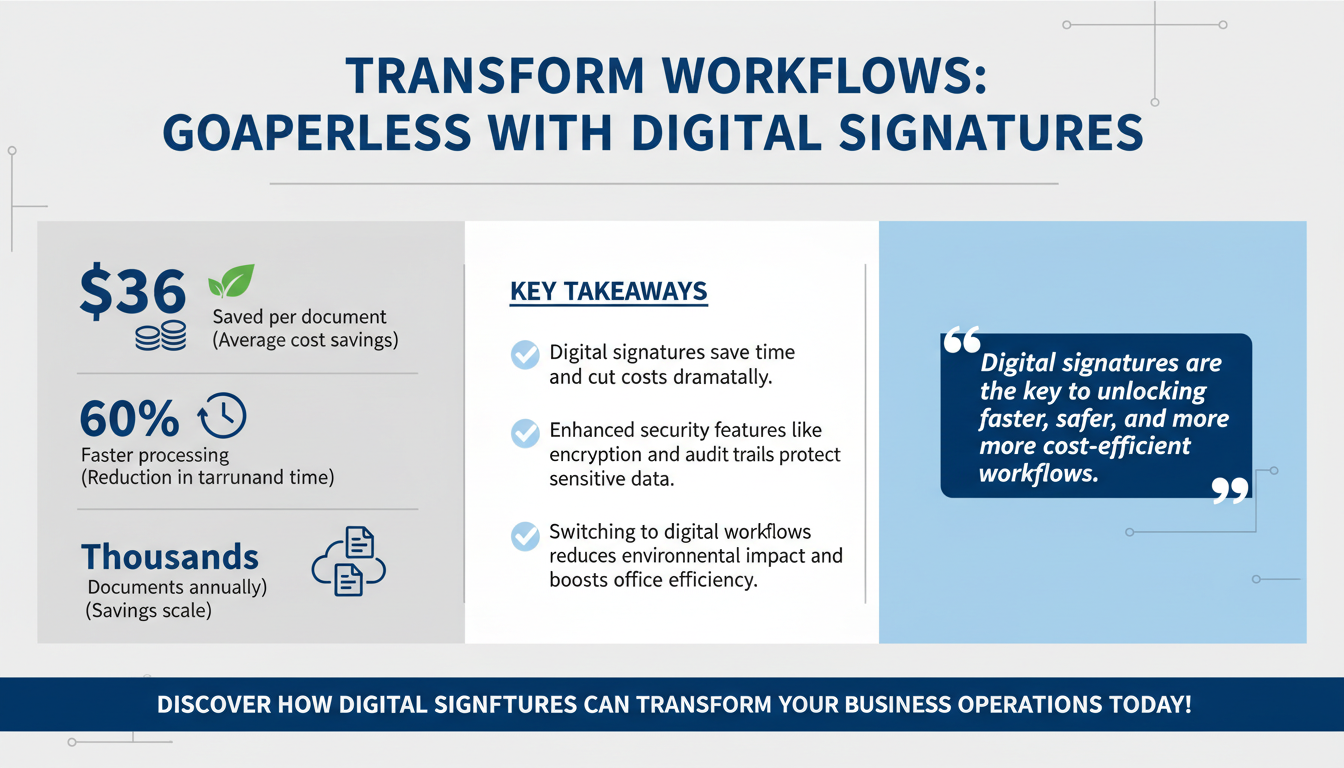
One of the most immediate and tangible benefits of digital signatures is cost savings. Businesses save money by eliminating expenses associated with paper, printing, ink, storage, and courier services. According to a Forbes article, companies using digital signatures save an average of $36 per document. For organizations that process thousands of documents annually, these savings add up significantly.
Beyond direct cost savings, there are also indirect financial benefits. For example, reducing processing times can enhance customer satisfaction, leading to increased client retention and repeat business. Additionally, businesses can free up office space previously dedicated to storing physical documents, potentially saving on real estate costs.
2. Time Efficiency
Manual processes often result in delays due to physical signatures, document transportation, and approval bottlenecks. Digital signatures enable instant signing and processing, reducing turnaround times dramatically. A study from McKinsey revealed that businesses adopting digital workflows experience a 60% reduction in processing time, allowing teams to focus on higher-priority tasks.
Consider an example from the legal industry, where contracts often require multiple signatures from parties in different locations. With traditional workflows, this process could take days or even weeks. By adopting digital signatures, law firms can finalize contracts within hours, accelerating project timelines and improving client satisfaction.
3. Enhanced Security
Security is a major concern in today’s digital landscape. Digital signatures use advanced encryption and authentication methods to ensure document integrity and prevent unauthorized access. Features like tamper-proof seals and audit trails make digital signatures more secure than traditional methods.
For instance, digital signature platforms often include two-factor authentication (2FA) to verify the identity of signatories. This added layer of security ensures that only authorized individuals can sign or access documents. Additionally, audit trails provide a detailed history of when and by whom a document was accessed or signed, offering transparency and accountability.
4. Legal Compliance
Digital signatures comply with regional and international laws, including the U.S. ESIGN Act and Europe’s eIDAS Regulation. These frameworks ensure that digital signatures are legally binding, providing businesses with the confidence to adopt them in critical transactions.
For global businesses, compliance with multiple regulatory frameworks is essential. Digital signature platforms often offer region-specific compliance settings, enabling organizations to meet legal requirements in different jurisdictions. For example, multinational corporations can ensure their contracts are valid whether they are signed in the United States, Europe, or Asia.
5. Environmental Benefits
Transitioning to digital workflows significantly reduces paper consumption, contributing to a more sustainable business model. A report by the Environmental Paper Network estimates that paper production accounts for 2% of global carbon emissions. By going digital, businesses can make a meaningful impact on environmental conservation.
In addition to reducing carbon emissions, adopting digital workflows can help businesses align with corporate social responsibility (CSR) goals. Many companies now include sustainability metrics in their annual reports, and moving to digital signatures is an actionable step toward reducing their environmental footprint.
Real-World Example: Financial Services Firm
A midsize financial services firm in California transitioned to digital signatures to handle client contracts. Before the switch, the firm spent $15,000 annually on printing and courier services. After implementing a digital signature solution, they not only eliminated these costs but also reduced contract turnaround time from five days to under 24 hours.
This transformation also improved client relationships. Faster processing times meant clients received their contracts more quickly, enhancing their overall experience. The firm reported a 25% increase in client satisfaction scores within the first six months of adoption.
Assessing Your Current Workflow
The first step in transitioning to digital signatures is a thorough evaluation of your existing workflow. Understanding your current processes helps identify inefficiencies and areas where digital solutions can have the greatest impact. Conducting a workflow audit is crucial for laying the foundation for a successful transition.

1. Map Out Processes
Document every step of your current workflow, from document creation to final approval. Use visual tools like flowcharts to get a clear picture of how documents move through your organization. For instance, a typical paper-based workflow might involve creating a document, printing it, obtaining physical signatures, and sending it via courier for final approval.
To enhance the mapping process, involve key stakeholders from different departments. Their input can help identify hidden inefficiencies or redundancies that may not be immediately apparent. Tools like Microsoft Visio or Lucidchart can be valuable for creating detailed workflow diagrams.
2. Identify Bottlenecks
Pinpoint areas where delays frequently occur. Are approvals often held up due to signatories being unavailable? Does courier delivery introduce unnecessary lag? Identifying bottlenecks helps you target the most critical pain points for improvement.
For example, a healthcare organization may find that obtaining doctor signatures for medical records is a significant bottleneck. By transitioning to digital signatures, doctors can sign documents remotely, eliminating delays caused by physical presence requirements.
3. Quantify Costs
Calculate the financial impact of your current processes. Include costs associated with printing, storage, courier services, and lost productivity due to delays. This data will be instrumental in building a business case for the transition.
To make the analysis more comprehensive, consider intangible costs such as employee frustration caused by outdated processes. Surveys or interviews with staff can provide insights into hidden inefficiencies that may not be immediately apparent in financial data.
4. Assess Technology Readiness
Evaluate your organization’s existing IT infrastructure. Does your current system support the integration of digital signature platforms? If not, what upgrades are necessary to ensure a smooth transition?
Conducting a technology readiness assessment can help identify gaps in your current setup. For instance, if your organization relies on outdated hardware or lacks robust cybersecurity measures, these issues should be addressed before implementing a digital signature solution.
According to McKinsey, businesses that conduct a detailed workflow analysis before adopting digital solutions are 45% more likely to achieve a seamless transition. Workflow audits not only help in planning but also provide a baseline for measuring the success of the implementation.
Choosing the Right Digital Signature Solution
Not all digital signature platforms are created equal. Selecting the right solution is a critical step that requires careful consideration of your business needs, technical requirements, and long-term goals. Here’s how to evaluate your options:

1. Security Features
Ensure the platform offers robust security measures, including advanced encryption, multi-factor authentication, and audit trails. These features protect sensitive information and ensure compliance with legal standards.
For businesses in highly regulated industries, such as finance or healthcare, additional security features may be necessary. For example, platforms that offer HIPAA compliance are essential for healthcare providers handling sensitive patient information.
2. Integration Capabilities
Select a platform that integrates seamlessly with your existing tools, such as CRM systems, document management software, and cloud storage solutions. Integration minimizes disruptions and allows for a smoother workflow.
For instance, a construction company might benefit from a platform that integrates with project management tools like Procore. This allows documents to be signed and immediately linked to specific projects, improving organization and efficiency.
3. Scalability
Your chosen solution should be scalable to accommodate your organization’s growth. Whether you’re a small startup or a large enterprise, the platform should be able to handle increasing volumes of documents and users.
A small business might start with a basic plan that covers 50 documents per month but later upgrade to an enterprise-level plan as its operations expand. Choosing a scalable solution ensures a smooth transition as your needs evolve.
4. User Experience
An intuitive interface is essential for encouraging widespread adoption. Look for a platform that offers user-friendly features, such as drag-and-drop functionality and guided signing workflows.
Platforms that offer mobile-friendly interfaces can be particularly beneficial for organizations with remote or field-based employees. For example, sales teams working in the field can use their smartphones to obtain client signatures on the spot, streamlining the sales process.
Case Study: Real Estate Firm
A real estate agency in New York implemented a digital signature platform that integrated directly with their CRM software. This integration allowed agents to send contracts for signatures directly from the CRM, reducing document processing time by 70% and significantly improving client satisfaction.
The platform’s mobile compatibility also enabled agents to finalize deals while on-site with clients, giving them a competitive edge in a fast-paced market.
Developing an Implementation Plan
Implementing digital signatures requires a structured approach to ensure a smooth transition. A well-thought-out implementation plan minimizes disruptions and promotes seamless adoption across the organization.

1. Set Objectives
Define clear goals for the transition. For example, you might aim to reduce document processing times by 50% or achieve full compliance with industry regulations.
Your objectives should be specific, measurable, achievable, relevant, and time-bound (SMART). For example, "Reduce contract approval times from 7 days to 2 days within six months."
2. Create a Timeline
Establish realistic milestones for each phase of the implementation, from initial planning to full deployment. A typical timeline might include a two-week pilot test, followed by a one-month training period and a gradual rollout over three months.
Breaking the implementation into phases allows for easier troubleshooting and adjustment. For instance, a pilot phase can reveal unforeseen challenges, which can be addressed before a full-scale rollout.
3. Appoint a Project Team
Assemble a cross-functional team responsible for overseeing the transition. Include representatives from IT, operations, legal, and any other relevant departments to ensure all aspects of the implementation are covered.
Having a dedicated project team ensures accountability and fosters collaboration. Regular team meetings can help monitor progress and address any emerging issues promptly.
4. Conduct Pilot Tests
Test the solution with a small group of users to identify potential issues and gather initial feedback. Use insights from the pilot phase to refine your implementation strategy.
For example, a marketing department might test the platform first by using it to approve creative briefs, providing valuable feedback that can be applied across other departments.
5. Develop Training Materials
Provide comprehensive training resources, such as video tutorials, user manuals, and in-person workshops. Ensure that employees are comfortable using the new platform before full deployment.
Interactive training sessions that include real-world scenarios can be particularly effective. For example, simulating the signing of a contract during a training session can help employees feel more confident using the platform.
Integrating Digital Signatures into Existing Workflows
A common concern among businesses is the potential for disruptions during the transition. The key to overcoming this challenge is seamless integration. Digital signature platforms should complement your current systems rather than replace them entirely.
1. Leverage APIs
Use APIs (Application Programming Interfaces) to integrate digital signature platforms with your existing software, such as Salesforce, Microsoft Teams, or Google Workspace. This ensures a smooth flow of data between systems.
For example, an e-commerce business could integrate a digital signature platform with its order management system, allowing customers to sign purchase agreements directly within the checkout process.
2. Automate Workflows
Set up automated workflows to trigger actions based on document status. For instance, you can configure the system to automatically notify stakeholders once a document has been signed.
Automation can also include reminders for pending signatures or alerts for expired documents, ensuring that critical processes stay on track.
3. Centralize Document Storage
Store signed documents in a secure, centralized repository that allows for easy access and retrieval. This not only improves efficiency but also enhances document security.
Centralized storage solutions can be particularly useful for audits, as they provide quick access to all required documents in one location. Features like search and tagging further streamline document retrieval.
Training Employees and Driving Adoption
Employee adoption is critical for the success of your transition. Resistance to change is a common barrier, but it can be mitigated through effective communication and training.
1. Communicate Benefits
Clearly articulate the benefits of digital signatures to your employees. Emphasize how the new system will simplify their tasks and reduce workloads.
For example, highlight specific pain points that the new system addresses, such as eliminating the need to track down physical signatures or reducing delays caused by courier services.
2. Provide Hands-On Training
Organize interactive workshops where employees can practice using the platform. Provide real-world scenarios to help them understand how the system will be used in their daily workflows.
Training sessions can be tailored to different departments. For instance, the HR team may focus on using digital signatures for onboarding documents, while the sales team practices signing and sending contracts.
3. Offer Ongoing Support
Establish a helpdesk or online resource center to address questions and resolve issues. Continuous support ensures that employees remain confident and proficient in using the platform.
Consider appointing internal "champions" who can serve as go-to experts for their teams. These individuals can provide immediate assistance and promote best practices.
Ensuring Legal and Regulatory Compliance
Legal compliance is a critical aspect of adopting digital signatures. Failure to comply with relevant laws could result in legal disputes and financial penalties. Here’s what you need to know:
1. Research Local Laws
Familiarize yourself with the regulations governing electronic signatures in your region. For example, the eIDAS Regulation applies to businesses operating in the European Union, while the ESIGN Act governs electronic signatures in the United States.
Consulting with legal experts or compliance officers can help ensure that your transition aligns with all relevant regulations. They can also provide guidance on industry-specific requirements.
2. Use Compliant Platforms
Choose a digital signature solution that meets legal standards, such as secure encryption and detailed audit trails. These features ensure that your digital signatures are legally enforceable.
For example, platforms that are ISO 27001 certified or offer SOC 2 compliance provide additional assurance of their security and reliability.
3. Maintain Records
Store signed documents in a secure location to provide evidence in case of disputes. Ensure that your storage solution complies with data protection regulations, such as GDPR.
Digital signature platforms often include features like automated backups and retention policies, which can simplify compliance with record-keeping requirements.
Measuring ROI and Continuous Improvement
After implementing digital signatures, it’s important to measure their impact on your business. Tracking key metrics allows you to assess the success of the transition and identify areas for improvement.
Metrics to Monitor
- Processing Time: Compare document turnaround times before and after the transition.
- Cost Savings: Track reductions in expenses related to paper, printing, and courier services.
- User Satisfaction: Gather feedback from employees and stakeholders to identify pain points and areas for enhancement.
To ensure continuous improvement, schedule regular reviews of your digital workflows. These reviews can help identify new inefficiencies or opportunities for further optimization, ensuring that your organization continues to reap the benefits of digital transformation.
Conclusion
Transitioning from paper-based workflows to digital signatures is an essential step for businesses aiming to improve efficiency, reduce costs, and enhance security. By understanding the benefits, assessing your current processes, choosing the right solution, and implementing a structured plan, you can make the switch seamlessly. Remember to prioritize employee training and compliance to ensure long-term success.
Ready to begin your journey? Explore Zignature’s digital signature solutions to find the perfect fit for your business.
To further enhance your digital workflows, explore our sister platforms: Apparatuz for workflow automation, Applicantz for recruitment management, Schedly for scheduling and appointments, Supportly for customer support, and Zatisfied for feedback management. Together, these tools create a comprehensive ecosystem that complements your digital signature strategy.