
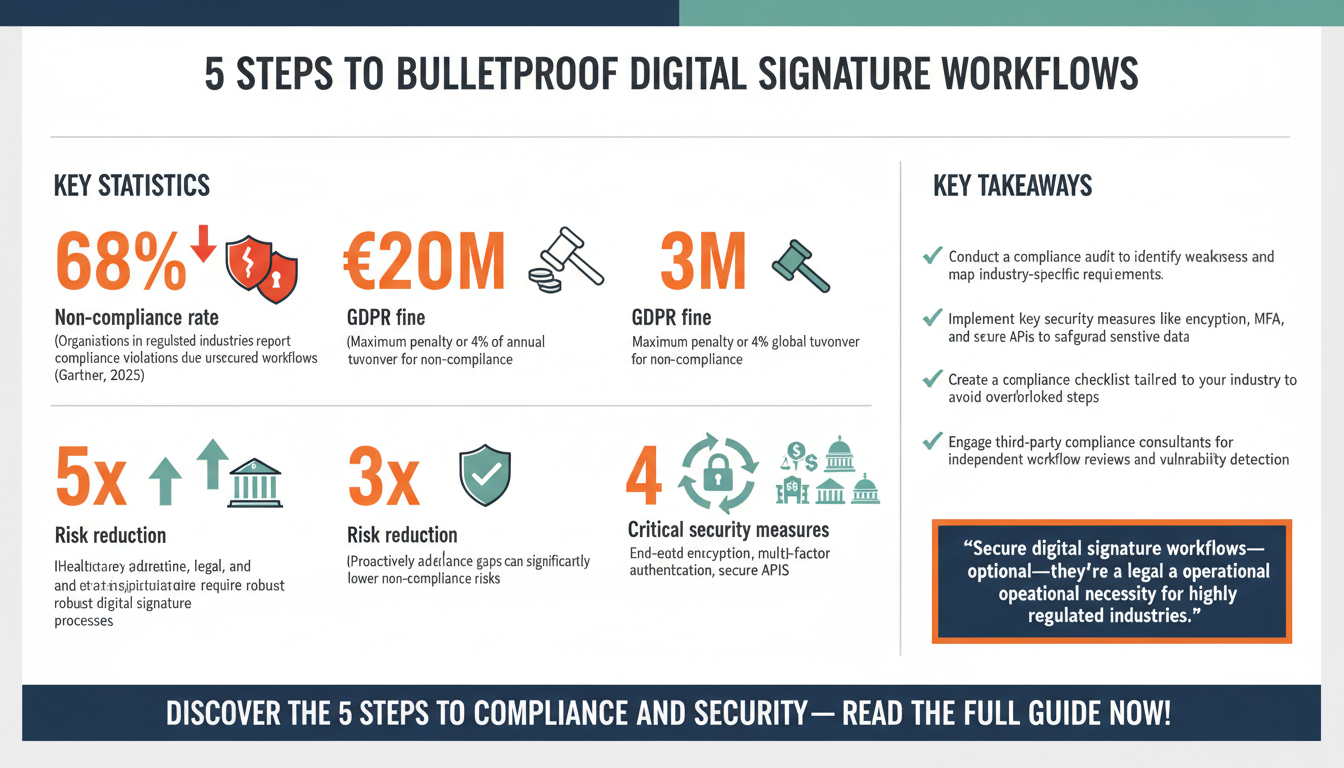
In today’s digital age, the need for secure, efficient, and compliant digital signature workflows has never been more critical—especially for highly regulated industries like healthcare, finance, legal services, and government. These sectors face stringent compliance requirements, such as HIPAA, GDPR, and SOX, which demand robust processes for handling sensitive data. Ensuring the integrity and security of digital signatures is not just a matter of convenience; it’s a legal and operational necessity.
Highly regulated industries operate under constant scrutiny, with compliance violations carrying hefty fines, reputational damage, and even legal repercussions. For instance, GDPR non-compliance can result in fines of up to €20 million or 4% of annual global turnover, whichever is higher. Consequently, adopting a secure digital signature workflow isn’t just about selecting the right tool—it’s about creating an end-to-end process that ensures compliance, enhances operational efficiency, and mitigates risks.
This comprehensive guide will walk you through the five essential steps to establish a secure digital signature workflow tailored for highly regulated industries. Backed by expert insights, actionable strategies, and real-world examples, this article serves as your definitive roadmap to navigating the complexities of digital signature implementation.
Step 1: Assess Your Compliance and Security Requirements
Before implementing a digital signature workflow, the first step is to assess your organization’s compliance and security requirements. Highly regulated industries operate within a framework of laws and guidelines specific to their sector. For example, healthcare organizations must adhere to the Health Insurance Portability and Accountability Act (HIPAA), while financial institutions must comply with the Sarbanes-Oxley Act (SOX). Each regulation defines unique parameters for data privacy, encryption, and audit trails, making compliance non-negotiable.
Conducting a Compliance Audit
To ensure compliance, begin with a comprehensive audit of your existing document management processes. This includes identifying weaknesses such as unsecured storage of signed documents, lack of access controls, or inadequate tracking of document approvals. Collaborate with your legal and compliance teams to map out industry-specific regulatory requirements. For instance, GDPR mandates that electronic signatures and the data associated with them must be securely stored within the European Union, while SOX requires thorough audit trails to trace document approvals.
Understanding the sensitivity of the documents you handle is also crucial. Are you managing contracts containing personal health information (PHI), financial transaction records, or intellectual property? Each type of document carries its own risk profile, which will dictate the necessary security measures. Implementing end-to-end encryption, multi-factor authentication (MFA), and secure APIs for integration are just some of the strategies you can employ to safeguard sensitive data.
Industry Insights and Data
In a 2025 Gartner report, 68% of organizations in highly regulated industries reported experiencing compliance violations due to unsecured digital workflows. These violations often stem from skipped steps in the implementation process, such as failing to conduct a compliance audit or choosing a platform that lacks critical security features.
By proactively addressing compliance gaps during the planning phase, you can significantly reduce the risks of non-compliance and establish a strong foundation for your digital signature workflow.
Actionable Tips:
- Create a compliance checklist specific to your industry to ensure no critical requirement is overlooked.
- Engage third-party compliance consultants for an independent review of your workflows. These experts can identify vulnerabilities that internal teams may miss.
- Utilize tools like security risk assessment software to automate compliance audits and streamline the process.

Step 2: Choose the Right Digital Signature Solution
Choosing the right digital signature solution is the cornerstone of a secure workflow. With numerous options on the market, your selection process should focus on platforms that meet your industry’s compliance standards while offering robust security features. Not all solutions are created equal—some prioritize user-friendliness, while others excel in advanced security capabilities tailored for compliance-heavy industries.
Evaluating Key Features
When comparing digital signature solutions, prioritize the following criteria:
1. Security Features
The solution must offer advanced security measures such as AES-256 encryption, tamper-evident technology, and compliance with global security standards like ISO 27001 and SOC 2. Multi-factor authentication (MFA) is essential to prevent unauthorized access and ensures that only verified users can sign and access documents.
2. Compliance Certifications
Look for certifications that confirm adherence to global regulatory standards. For example, the FDA 21 CFR Part 11 certification is crucial for organizations in the life sciences, while eIDAS compliance is mandatory for electronic signatures used in the European Union. These certifications not only ensure legality but also provide peace of mind during audits.
3. Integration Capabilities
Your digital signature solution should seamlessly integrate with existing tools like document management systems (DMS), customer relationship management (CRM) platforms, and enterprise resource planning (ERP) software. Integration reduces manual input, minimizes errors, and accelerates document processing times. For instance, Zignature offers enterprise-grade security features and integrates with popular tools like Microsoft 365 and Salesforce, making it an ideal choice for regulated industries.
Data-Driven Benefits
Research from Forrester shows that organizations using a well-integrated digital signature solution experience a 40% reduction in document processing times and a 67% improvement in compliance adherence. These statistics underscore the importance of choosing a platform that aligns with your operational needs and regulatory requirements.
Pro Tip:
“When evaluating solutions, don’t just focus on the present. Choose a platform that scales with your organization’s growth and evolving compliance requirements over time.” – John Smith, IT Security Expert
Practical Advice:
- Request a free trial or demo to evaluate the platform’s usability and features.
- Verify certifications and conduct a vendor security assessment to ensure the solution meets compliance standards.
- Prepare a detailed RFP (Request for Proposal) to compare multiple vendors side by side.
Step 3: Design and Document Your Workflow
After selecting your digital signature solution, the next step is to design and document your workflow. Creating a structured, repeatable process ensures consistency, reduces errors, and facilitates compliance during audits. A well-documented workflow also aids in onboarding new employees and training stakeholders.
Mapping Out the Process
Identify the key stages of your digital signature workflow. A typical workflow in a regulated industry includes the following steps:
- Document Preparation: Upload the document to the platform and assign signers, defining their roles and permissions.
- Authentication: Verify the identity of signers using secure methods like MFA or biometric authentication.
- Signature Collection: Enable signers to review and electronically sign the document.
- Audit Trail Generation: Automatically generate a detailed log of all actions taken on the document, including timestamps and user identities.
- Secure Storage: Store the signed document in an encrypted repository for easy retrieval and compliance verification.
Leverage automation features available in your digital signature platform to streamline repetitive tasks. For example, automated reminders can prompt signers to complete pending actions, reducing delays and improving efficiency.
Expert Insight:
“The key to a secure workflow lies in automation and transparency. Documenting every step minimizes human errors and creates a defensible process for compliance reviews.” – Jane Doe, Compliance Consultant
Actionable Steps:
- Use visual aids like flowcharts to map out your workflow for easy understanding.
- Create a Standard Operating Procedure (SOP) that includes step-by-step instructions, screenshots, and troubleshooting tips.
- Test your workflow with a small team before rolling it out organization-wide to identify potential issues early.

Step 4: Train Your Team and Stakeholders
Even the most secure digital signature workflow can fail if your team doesn’t know how to use it effectively. Training is essential to ensure that employees and stakeholders understand their roles, how to use the platform, and the importance of compliance.
Identify the key user groups within your organization—such as legal teams, operations managers, and external clients—and tailor your training programs accordingly. Legal teams may need detailed training on compliance features, while external clients may benefit from a simple user guide.
Training Methods
- Workshops: Conduct hands-on workshops to familiarize employees with the platform’s features.
- Online Tutorials: Develop video tutorials that provide step-by-step guidance.
- Knowledge Base: Create an internal knowledge base with FAQs, troubleshooting tips, and best practices.
- Role-Based Training: Design training modules specific to each user group’s responsibilities within the workflow.
A 2024 McKinsey study revealed that effective training programs reduce employee errors by 45% and improve adoption rates by 63%. This highlights the importance of investing in comprehensive training initiatives.
Pro Tip:
“Engage a vendor trainer or subject matter expert to conduct the initial workshops. Their deep understanding of the platform ensures effective knowledge transfer.” – Sarah Johnson, Workflow Analyst

Step 5: Monitor, Audit, and Optimize
Implementation doesn’t end once your workflow is in place. Continuous monitoring, regular audits, and ongoing optimization are critical to maintaining compliance and improving efficiency over time.
Monitoring
Use analytics dashboards provided by your digital signature platform to track key metrics such as document completion times, error rates, and compliance adherence. Regular monitoring helps you identify bottlenecks and areas for improvement.
Auditing
Conduct regular audits to verify that your workflow meets regulatory requirements. Review audit trails, security logs, and user permissions to ensure no unauthorized activity has occurred. Consider engaging third-party auditors for an unbiased assessment.
Optimization
Gather feedback from users to pinpoint pain points and areas for improvement. For instance, if users frequently report difficulty accessing documents, consider simplifying your authentication process. Regularly update your workflow documentation to reflect any changes.
According to Deloitte, organizations that continuously optimize their workflows see a 35% increase in efficiency within the first year of implementation.
Checklist for Optimization:
- Set quarterly workflow reviews with key stakeholders.
- Track KPIs like average document processing time and error rates to measure success.
- Implement new features or upgrades provided by your digital signature vendor.

Conclusion
Implementing a secure digital signature workflow is a necessity for organizations in highly regulated industries. By following these five steps—assessing compliance requirements, choosing the right solution, designing a workflow, training your team, and continuously optimizing—you can create a process that not only meets regulatory standards but also enhances efficiency and reduces risks.
Ready to get started? Explore how Zignature can help your organization implement a compliant and efficient digital signature workflow. Contact us today to learn more.
To further enhance your digital workflows, explore our sister platforms: Apparatuz for workflow automation, Applicantz for recruitment management, Schedly for scheduling and appointments, Supportly for customer support, and Zatisfied for feedback management. Together, these tools create a comprehensive ecosystem that complements your digital signature strategy.