
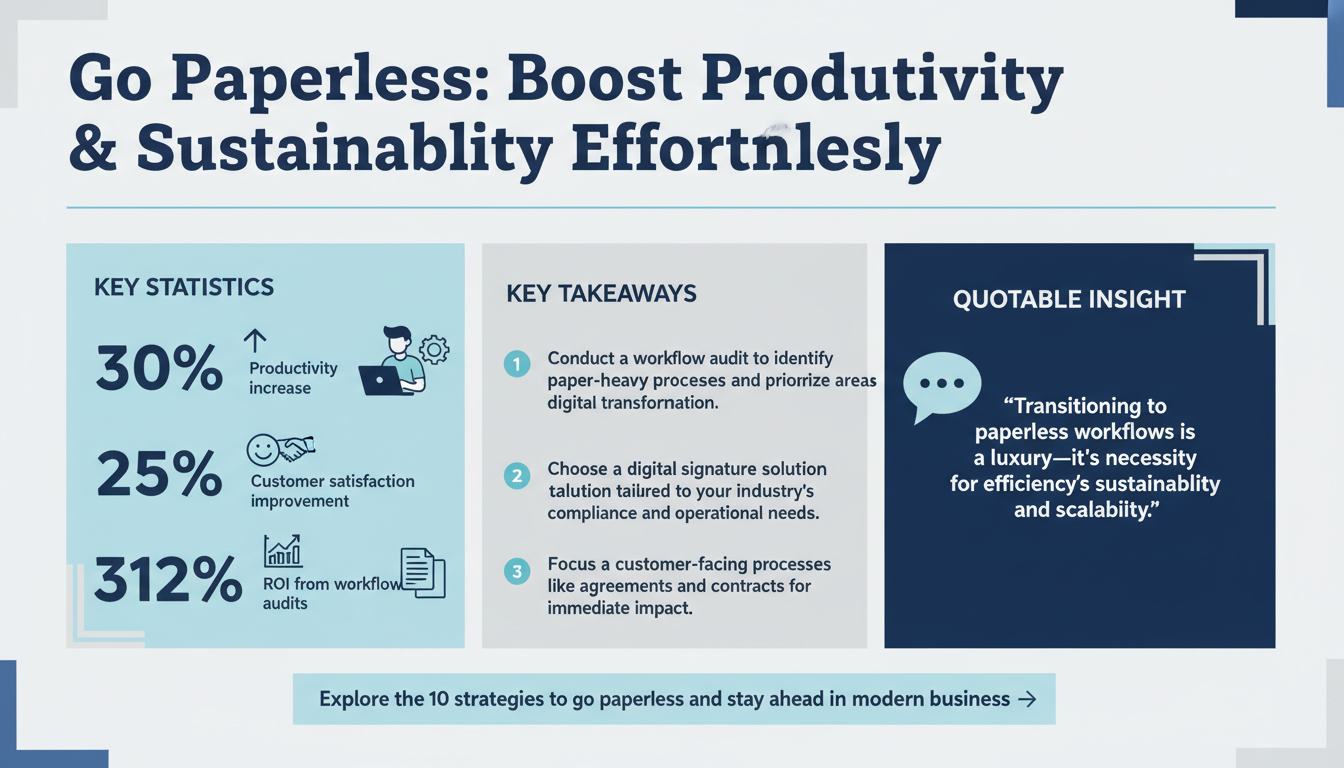
In an era where efficiency, sustainability, and security are paramount, transitioning to a fully paperless workflow is no longer a luxury—it’s a necessity. Paper-based workflows are time-consuming, prone to errors, and costly. Moreover, they hinder scalability and environmental sustainability, making them incompatible with the demands of modern business operations. Digital signature solutions, at the heart of this transformation, enable businesses to streamline processes, reduce costs, and enhance security. According to a Gartner study, organizations that embrace paperless workflows see an average productivity increase of 30%, while also improving customer satisfaction by 25%.
Transitioning to a paperless workflow doesn’t just benefit businesses internally; it also enhances client experiences. Customers increasingly prefer digital transactions because they are faster, more secure, and eco-friendly. Whether you’re a small business owner, a mid-sized enterprise, or part of a global corporation, this shift is essential to staying competitive. In this comprehensive guide, we’ll explore 10 actionable strategies to transition your business to a fully paperless workflow using digital signatures. These strategies are designed to help you navigate the shift efficiently and effectively while ensuring compliance with industry standards and regulations.
1. Conduct a Workflow Audit to Identify Paper-Heavy Processes
Before diving into digital transformation, it’s crucial to understand where your business currently stands. Start by conducting a detailed workflow audit to identify paper-heavy processes. These include document approvals, contract management, employee onboarding, customer agreements, and financial reporting. Mapping out these processes provides a clear picture of inefficiencies and helps you prioritize areas where digital signatures can make the most immediate impact.

For example, a real estate firm may find that 70% of their delays arise from manual contract signings. By implementing e-signatures, they can eliminate these bottlenecks entirely. Similarly, a law firm handling hundreds of client agreements every month can save hours of administrative time by automating contract approvals.
Real-world Insight: A Forrester study found that businesses that perform a workflow audit before implementing automation achieve a 312% ROI, compared to 50% for those that skip this step. This highlights the importance of planning and prioritization in your digital transformation journey.
Quick Win:
- Create a list of all processes that currently rely on paper.
- Calculate the time and cost associated with each process. For instance, determine how much time is spent printing, scanning, and mailing documents.
- Prioritize processes that are most time-sensitive or customer-facing, such as customer agreements or vendor contracts.
Key Takeaway:
- Understanding your starting point is critical. A workflow audit ensures you focus on the processes that will benefit most from going paperless.
2. Choose the Right Digital Signature Solution for Your Needs
Not all digital signature solutions are created equal. Selecting the right platform requires careful consideration of your business’s specific needs, including security, compliance, scalability, and integrations with existing tools. The right solution should simplify workflows while meeting legal and industry standards.

For example, healthcare organizations must prioritize HIPAA compliance to ensure patient data security, while financial services firms often focus on eIDAS or ESIGN compliance for legally binding contracts. Platforms like Zignature and DocuSign offer specialized features, such as tamper-evident audit trails, multi-factor authentication, and robust encryption protocols.
When evaluating platforms, also consider ease of use and employee training requirements. A user-friendly interface can significantly reduce the learning curve and improve adoption rates.
Statistic: According to Deloitte Insights, 50% of businesses cite security as their top concern when adopting digital tools. Investing in a secure and compliant solution minimizes risks while maximizing efficiency.
Common Mistake:
- Focusing solely on price without considering compliance requirements or feature sets. A cheaper solution may lack critical features, ultimately costing more in the long run due to inefficiencies or security breaches.
Key Takeaway:
- The right digital signature solution acts as the foundation of your paperless workflow. Evaluate options based on your industry’s unique needs and compliance requirements.
3. Train Your Team to Embrace Digital Tools
Adopting new technology is as much about people as it is about processes. Resistance to change is one of the biggest challenges businesses face during digital transformation. To counter this, invest in comprehensive training programs for your team. Demonstrate the benefits of digital signatures and paperless workflows, such as faster approvals, enhanced security, and reduced errors.

Engage employees by addressing their concerns about the new system. For example, highlight how automating repetitive tasks will free up time for higher-value work. A McKinsey study found that companies investing in employee training during digital transformations are 1.5 times more likely to succeed.
Practical Tips:
- Designate “digital champions” within your organization to serve as go-to resources for their teams. These peer leaders can offer hands-on support and answer questions.
- Organize workshops and webinars that focus on the practical application of digital tools in daily workflows.
- Encourage feedback during the training process to identify and address pain points early.
Key Takeaway:
- Empowering your team through training ensures a smoother transition and higher adoption of digital signature solutions.
4. Digitize Historical Documents for a Seamless Transition
Transitioning to a paperless workflow doesn’t just involve new processes—it also requires addressing legacy systems and historical documents. Scanning and digitizing these documents ensures that your business has a unified, searchable database moving forward. This process eliminates the need for cumbersome filing cabinets and enables faster document retrieval.

Consider using Optical Character Recognition (OCR) technology to convert scanned documents into editable and searchable files. OCR can extract data from contracts, invoices, or client records, making them accessible for future automation. According to IDC, companies that digitize historical documents reduce operational costs by 40% and improve data accuracy.
Steps to Get Started:
- Audit your existing paper records to identify critical documents that need digitization.
- Invest in high-speed scanners and OCR-enabled software for efficient processing.
- Organize digital files by creating a consistent naming convention and folder structure.
Key Takeaway:
- Digitizing historical documents ensures a seamless and comprehensive transition to a paperless workflow while improving accessibility and compliance.
5. Automate Workflow Approvals and Notifications
Manual approval processes are often a significant source of delays and errors in paper-based workflows. Automation can eliminate these inefficiencies. Digital signature platforms like Zignature allow you to set up automated workflows that route documents to the right stakeholders, send reminders, and track progress in real time.
For example, a legal team can automate contract approvals, ensuring that documents are reviewed and signed within predefined timelines. This reduces the risk of delays and improves compliance. Teams can also set up automated notifications to alert stakeholders when actions are required, minimizing bottlenecks.
Statistic: Research from BCG shows that automation can reduce document processing times by up to 80%, freeing up employees to focus on higher-value tasks.
Key Takeaway:
- Automating workflows not only reduces delays but also enhances accuracy and accountability, leading to more efficient operations.
6. Ensure Compliance with Legal and Industry Standards
Compliance is a critical consideration when implementing digital signature solutions. Different industries and regions have specific regulations governing the use of e-signatures. For example, the ESIGN Act in the United States and eIDAS Regulation in the EU set clear standards for electronic signatures.
Work with your legal and compliance teams to ensure that your chosen solution meets all necessary requirements. Platforms like Zignature provide robust compliance features, including tamper-evident seals, audit trails, and secure storage options.
Key Takeaway:
- Compliance is non-negotiable. Ensure your digital signature solution adheres to all relevant legal and industry standards to avoid penalties and risks.
Conclusion
Transitioning to a paperless workflow with digital signatures is no longer just an option—it’s a strategic imperative for businesses looking to enhance efficiency, security, and sustainability. By conducting a thorough workflow audit, selecting the right digital tools, training your team, and ensuring compliance, you can streamline operations and deliver a superior customer experience. Implement these actionable strategies today to stay ahead in the rapidly evolving digital landscape.
To further enhance your digital workflows, explore our sister platforms: Apparatuz for workflow automation, Applicantz for recruitment management, Schedly for scheduling and appointments, Supportly for customer support, and Zatisfied for feedback management. Together, these tools create a comprehensive ecosystem that complements your digital signature strategy.